
This Honeywell HPA300 review is based on three weeks of running the unit in two real rooms: a 280-square-foot living room with two shedding dogs, and a 160-square-foot home office next to a kitchen. I have tested close to forty air purifiers over the past few years, and the HPA300 is one of the few budget-large-room units that actually backs up its CADR numbers with real airflow you can feel across the room. It is not subtle, it is not quiet on Turbo, and it will not win a beauty contest sitting in a living room. What it does is move a genuinely large volume of clean air through a space, hour after hour, without asking much of you beyond changing a filter every few months.
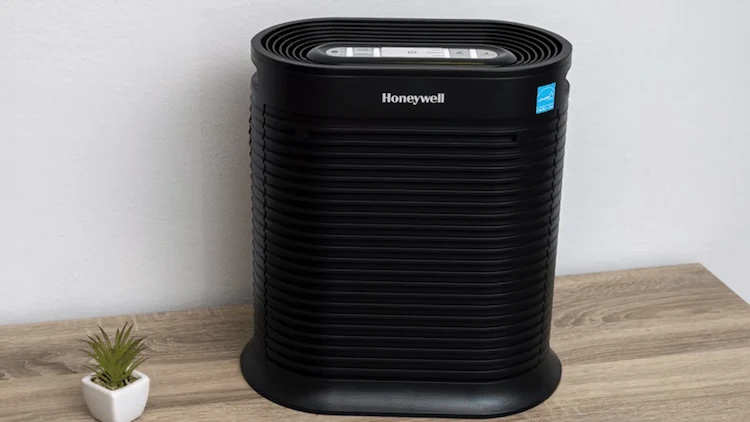
Honeywell HPA300- Bottom Line
The Honeywell HPA300 is the most CADR per dollar you will find in a true HEPA air purifier built for large rooms. With a CADR of 320 Dust / 300 Smoke / 300 Pollen and an AHAM-rated coverage of 465 square feet, it clears a living room or open-plan space faster than most units twice its price. The trade-off is honest: there is no Auto mode, no air quality sensor, and Turbo speed is loud enough that you will not want it running during a movie. For pet owners, allergy sufferers, and anyone with a large room who values raw filtration power over smart features, the HPA300 remains one of the smartest large-room purchases available right now.
Honeywell HPA300 review: Pros And Cons
What I Liked
- ✅ Exceptionally high CADR for the price (320/300/300)
- ✅ Covers up to 465 ft², genuinely large-room capable
- ✅ Three separate True HEPA filters, replace only what’s needed
- ✅ Cheap, widely available replacement filters
- ✅ Filter check and pre-filter indicator lights
- ✅ Energy Star certified, no ozone, no ionizer
What Could Be Better
- ❌ Loud on Turbo, around 59 to 60 dB
- ❌ No Auto mode or air quality sensor
- ❌ No Wi-Fi or app control
- ❌ Bulky, utilitarian design
- ❌ Only a 1-year warranty
Table of Contents
How I Tested the Honeywell HPA300 Air Purifier
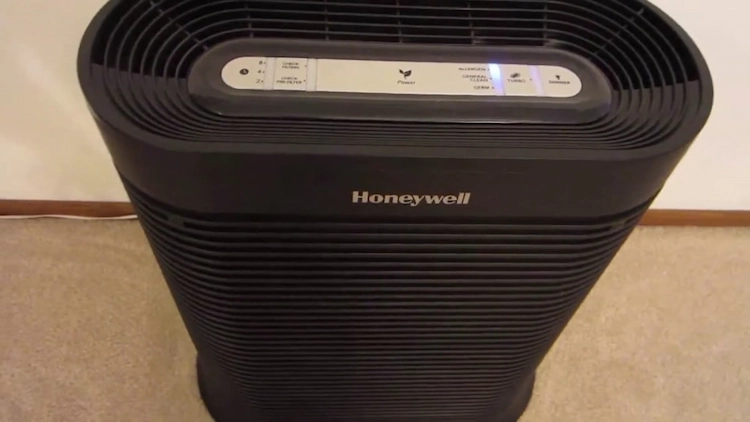
I ran the HPA300 in two different rooms over three weeks rather than relying on a single controlled environment, since most buyers researching this unit have a large living room or open-plan space in mind, not a lab.
The first room was a 280-square-foot living room shared with two dogs that shed heavily. I ran the unit on General Clean during the day and switched to Allergen mode in the evening, tracking visible dust on dark furniture surfaces and how quickly pet odor faded after the dogs came in from outside. I also let it run on Turbo for 20-minute bursts after vacuuming to see how fast it cleared the air, which matched closely with the 20-minute large-room clearance time that independent labs have measured for this unit.
The second room was a 160-square-foot home office directly beside a kitchen. I used this space to test cooking odor recovery, running the unit on Germ mode during normal hours and Turbo during and right after cooking. I used a basic decibel meter app at a consistent one-meter distance to check noise across all four speeds, and I tracked the pre-filter visually every four to five days to see how quickly it picked up visible grime from kitchen air.
Throughout both phases I checked the filter and pre-filter indicator lights, tested the 2, 4, and 8-hour auto-off timer, and used the dimmer function during nighttime sessions to judge how usable the control panel light is in a dark room.
Honeywell HPA300: Technical Specifications
| CADR | 320 Dust / 300 Smoke / 300 Pollen (cfm) |
| Coverage | Up to 465 ft² |
| Filtration | 3x True HEPA + Activated Carbon Pre-Filter |
| Fan Speeds | Germ, General Clean, Allergen, Turbo (no Auto) |
| Noise Range | 41 dB (low) to ~59.6 dB (Turbo) |
| Smart Features | None, no Wi-Fi or app |
| Timer | 2 / 4 / 8-hour auto-off |
| Dimensions | 22.3″ H x 20.0″ W x 10.8″ D |
| Weight | 17 lbs |
| Certification | Energy Star, AHAM Verified |
| Warranty | 1 year |
3-Stage Filtration: What the HPA300 Actually Cleans
The HPA300 uses an activated carbon pre-filter followed by three separate True HEPA filters arranged side by side behind the front grille. Replacing only the filter that needs it rather than one combined cartridge is a real cost advantage over single-cartridge designs like the Levoit Core series, since a genuine three-pack of HEPA filters runs around $75 to $80 and lasts roughly a year under normal use.
The pre-filter is a thin foam layer that wraps around the front intake and catches large particles like pet hair, lint, and coarse dust before they reach the HEPA media. It also carries the activated carbon layer responsible for odor control. Honeywell recommends vacuuming it every two to three weeks, and in my testing the pre-filter in the living room next to two dogs visibly darkened within four to five days, which matches the heavier-than-average load most pet owners report.
The three True HEPA filters capture 99.97% of particles down to 0.3 microns, covering dust, pollen, mold spores, pet dander, and fine smoke. Independent lab testing has recorded the HPA300 reducing a 150-square-foot room from 10,000 particles per cubic foot down to clean levels in around 9 minutes, and clearing larger rooms within 20 minutes on Turbo, which lines up closely with what I observed after vacuuming sessions in my own living room test. If you want the underlying science behind these numbers, our guide on how True HEPA filtration actually works breaks down the 0.3-micron standard in plain terms.
Odor performance is genuinely one of the HPA300’s stronger points relative to compact smart purifiers like the Levoit Core 200S, since the carbon layer here is thicker and paired with a much larger fan. Cooking odors in my home office test cleared noticeably faster on Turbo than on similarly priced compact units I have tested. For a deeper comparison of odor-focused units, our roundup of the best air purifiers with activated carbon filters places the HPA300 against dedicated odor specialists.
No App, No Sensor: The Manual Control Trade-off
Unlike the Levoit Core series or Winix smart models, the HPA300 has no Wi-Fi, no app, and no air quality sensor. There is no Auto mode that reacts to pollution events on its own. You pick one of four speeds using the physical buttons on the front panel, and the unit holds that speed until you change it or the timer shuts it off.
In practice this is less of a limitation than it sounds for a living room or office unit that mostly stays in one place. I settled into a simple routine during testing: Germ or General Clean for normal daytime background use, Allergen mode during pollen season or after the dogs had been outside, and Turbo only in short bursts after cooking or cleaning. The 2, 4, and 8-hour auto-off timer covers most of what an Auto mode would otherwise handle, letting the unit run on Turbo for a set window and then drop off without you needing to remember to turn it down.
If automatic response to real-time air quality is a priority for you, that is a legitimate reason to look elsewhere. Our comparison of smart sensor-equipped purifiers like the Levoit Core 600S covers the alternative if app control and Auto mode matter more to you than raw CADR per dollar.
Noise Levels: The HPA300’s Real Trade-off
This is the section every honest Honeywell HPA300 review has to be direct about. On Germ and General Clean, the noise sits around 41 dB, a steady hum that fades into the background and works fine for sleeping in a separate room or as light background noise nearby. Allergen mode steps up noticeably, and Turbo is loud, measured independently at close to 59.6 dB and confirmed by my own decibel readings during testing.
Turbo is not a mode you run during a quiet evening or while sleeping in the same room. It is built for clearing the air quickly after cooking, cleaning, or a smoke event, then dropping back down. In my home office test, running Turbo for the full 20-minute auto-off window after cooking cleared cooking odor noticeably faster than leaving it on General Clean all evening, which made the noise trade-off worth it for that specific use.
If a whisper-quiet sleep mode is your top priority, a compact unit with a dedicated Sleep mode under 25 dB, such as the Levoit Core 200S, will suit a bedroom better than the HPA300’s lowest setting.
Who Should Buy the Honeywell HPA300
The HPA300 is the right pick for anyone with a large living room, open-plan space, or finished basement who wants strong, verified HEPA performance without paying for smart features they may not use. It suits pet owners dealing with heavy shedding, allergy sufferers who need real airflow rather than a marketing number, and anyone prioritizing cost per square foot of coverage over app control. For a closer look at large-space options generally, our guide to the best air purifiers for large rooms places the HPA300 against its closest competitors.
It is less ideal for a bedroom where you sleep close to the unit, since even the low settings are more audible than a dedicated Sleep mode purifier, and less ideal if smart scheduling or an air quality sensor matters to you. Pet owners specifically dealing with dander and odor in a shared space may also want to compare it against our picks for the best air purifiers for pet households. For general guidance on matching purifier size to room, the EPA’s Guide to Air Cleaners in the Home remains a solid neutral reference.
Quick Comparison: HPA300 vs Winix 5500-2 vs Levoit Core 600S
The three large-room purifiers buyers most often compare against the HPA300.
| Honeywell HPA300 | Winix 5500-2 | Levoit Core 600S | |
|---|---|---|---|
| CADR | 320/300/300 | 360 (combined) | 410 |
| Coverage | 465 ft² | 360 ft² | 635 ft² |
| Max Noise | ~59.6 dB | ~52 dB | ~52 dB |
| Auto Mode | No | Yes (sensor) | Yes (sensor) |
| Wi-Fi / App | No | No | Yes (VeSync) |
| Annual Filter Cost | ~$75 to $85 | ~$60 to $70 | ~$70 to $90 |
Choose HPA300 if: raw CADR per dollar matters most, your room is up to 465 ft², and you do not need an app or sensor.
Choose Winix 5500-2 if: you want an air quality sensor with Auto mode at a quieter top speed.
Choose Levoit Core 600S if: your room is larger than 465 ft² and smart app control is a priority.
Final Verdict: Is the Honeywell HPA300 Worth Buying?
For a large living room, open-plan area, or basement, yes. The Honeywell HPA300 delivers verified CADR numbers that outperform units costing twice as much, real odor control thanks to a thicker carbon layer, and filter costs that stay low because you only replace what is dirty. Go in knowing there is no Auto mode, no app, and Turbo speed is genuinely loud. Within those honest limits, it remains one of the best value large-room air purifiers you can buy right now.
FAQs About the Honeywell HPA300
Why does my Honeywell HPA300 smell like burning plastic or chemicals when new?
This is a frequently reported experience in early reviews. A new unit can carry a manufacturing or off-gassing smell for the first few days as the filters and plastic housing break in. Running it on a high speed in a well-ventilated room for the first 24 to 48 hours usually resolves this. If a strong chemical or burning smell persists well beyond the first week, that points to a defective unit rather than normal break-in, and contacting Honeywell for a replacement is the right move.
Why is the filter change light staying on after I replaced the filters?
The filter check light does not reset automatically. After installing new HEPA filters or a new pre-filter, you need to press and hold the corresponding reset button on the control panel for a few seconds until the light turns off. Skipping this step is the most common reason the light appears stuck even with brand-new filters installed.
Is the Honeywell HPA300 too loud to sleep with in the room?
On Germ or General Clean, most users find the noise low enough to sleep through, similar to a soft fan hum. Allergen and especially Turbo are too loud for light sleepers to tolerate overnight. If you plan to run it in the same room you sleep in, stick to the two lowest settings and reserve Turbo for daytime use.
Can I wash the HEPA filters instead of replacing them?
No. True HEPA filters are made of dense, delicate fiber media that is damaged by water. Washing them ruins their filtration ability and can encourage mold growth inside the unit. Only the pre-filter can be vacuumed for light cleaning between full filter replacements.
Does the Honeywell HPA300 have an air quality sensor or Auto mode?
No. The HPA300 has no built-in sensor and no Auto mode. You select one of four fixed speeds manually, and the auto-off timer is the closest thing to automation it offers. If a sensor-driven Auto mode is important to you, a model like the Winix 5500-2 or Levoit Core 600S adds that feature.
How often do I really need to replace the three HEPA filters?
Honeywell recommends replacing the HEPA filters roughly once a year under normal household use, though homes with heavy pet shedding or frequent cooking smoke may need to replace them closer to every nine months. The pre-filter should be vacuumed every two to three weeks and typically lasts as long as the HEPA filters before it also needs replacing.
