I have fixed this exact problem on more Levoit units than I can count, and the good news is that a red light on your Levoit air purifier is almost never a sign that something is seriously wrong. In most cases it takes under two minutes to clear. The issue is that not all red lights on Levoit purifiers mean the same thing, and the fix depends entirely on which type you are dealing with. Some models show a red light when the filter timer runs out, others show red when the air quality sensor detects poor air, and in rare cases you get both on the same unit. Getting the diagnosis right before you start pressing buttons is what saves you the frustration of doing the reset three times and wondering why it is not working. This guide covers every current Levoit model, every red light type, and every fix in the correct order.
Quick Answer
Most Levoit red lights clear in 2 minutes with one simple reset step.
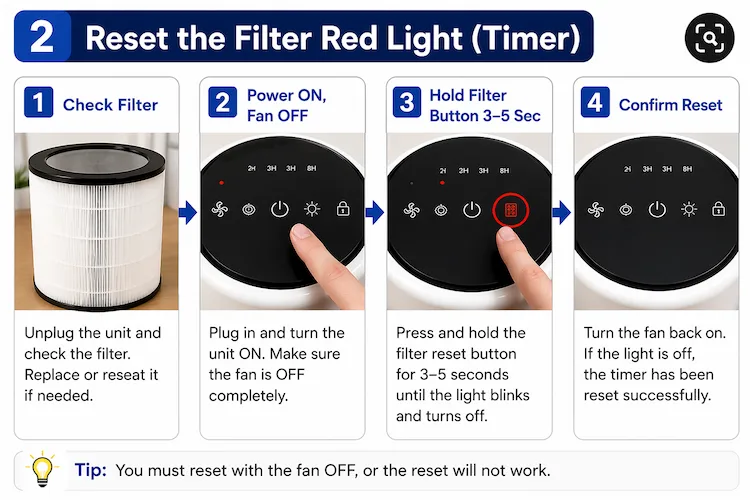
For a filter indicator red light: replace or reseat your filter, turn the unit ON with the fan OFF, then hold the filter reset button for 3 to 5 seconds until the light turns off.
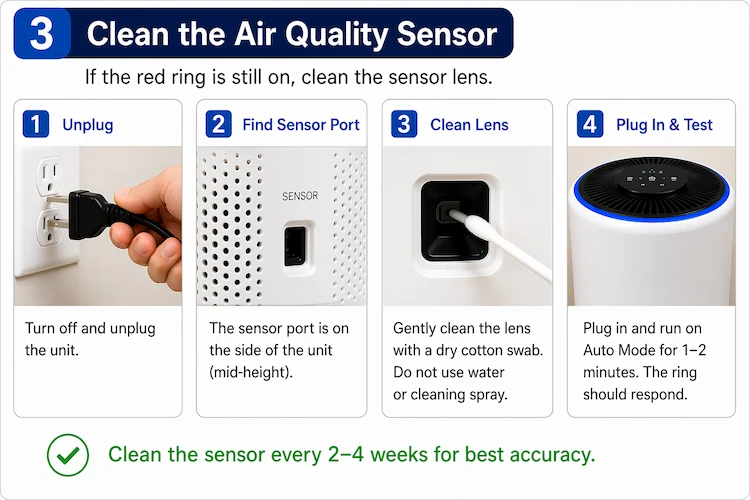
For a air quality sensor red light: clean the small sensor lens with a dry cotton swab. A dusty sensor reads clean air as polluted and keeps the ring red until you wipe it.
The Red Light on Your Levoit: Two Completely Different Problems
This is the step most troubleshooting guides skip, and it is the reason people end up resetting the wrong thing. Levoit uses red light indicators for two separate systems, and the fix is different for each one.
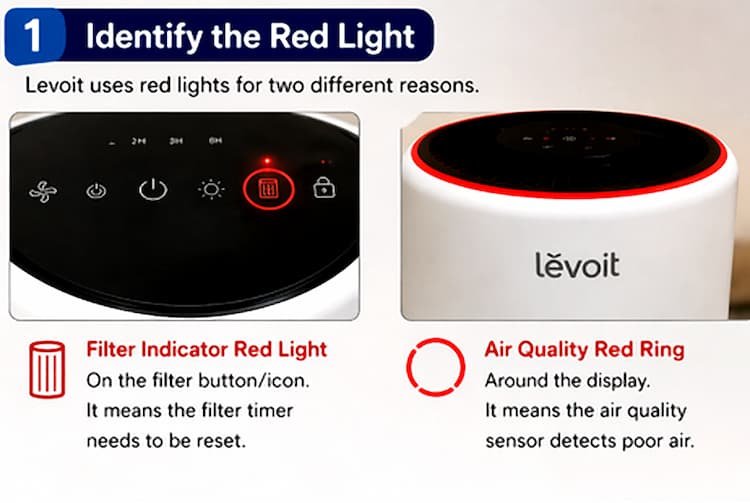
The first type is the filter indicator light. This appears as a solid red or blinking red light on the small button or icon that looks like a filter or fan symbol on your control panel. It is purely timer-based. Levoit programs the unit to count operating hours, and when it reaches the threshold (usually around 2,000 hours), the light turns red regardless of whether the filter is actually dirty or not. Models that use this system include the Core 200S, Core 300, Core 300S, LV-H132, LV-H128, and LV-PUR131, among others.
The second type is the air quality indicator ring or light. This only exists on models with a built-in particle sensor, such as the Core 400S, Core 600S, Vital 200S, and Vital 200S-P. The ring changes color in real time based on what the sensor detects: blue means clean air, orange or yellow means moderate, and red means the sensor is picking up high levels of fine particles like dust, smoke, or dander. This light has nothing to do with the filter timer. It responds to what is actually in the room air, and to what is on the sensor lens.
Check your model’s control panel first. If the red light is on a small button with a filter icon, you are dealing with the first type. If the red glow is a ring around the display or base of the unit, you are dealing with the second type. Some models, like the Vital 200S-P, can show both lights simultaneously if the filter is due and the air is also poor quality.
In many cases, the red light appears simply because the filter needs a proper clean, not a full replacement. Before you reset anything, check our guide on how to clean a Levoit filter first.
How to Reset the Filter Red Light on Levoit Air Purifiers
Follow these steps in order. Skipping steps or having the fan running during the reset is the most common reason the light stays on after the attempt.
Check and replace (or reseat) your filter
Unplug the unit and open the filter compartment. If your filter has been running for 6 to 8 months or the pre-filter is clogged with debris, replace it with a genuine Levoit filter for your model. If the filter looks clean and was recently installed, remove it, check for any packaging plastic still attached, and firmly reseat it. Even a slightly loose filter can prevent a successful reset.
Plug the unit in and turn it ON with the fan OFF
This step is critical and is missed constantly. The purifier must be powered on but with the fan completely stopped. You cannot reset the filter indicator while the fan is running at any speed. Press the power button to turn the unit on, then press the fan speed button to stop the fan if it starts automatically.
Hold the filter reset button for 3 to 5 seconds
Press and hold the button with the filter icon (on most models this is the same button that shows the red light). Hold it for at least 3 seconds and up to 7 seconds on stubborn units. Do not release when you hear the first beep. Keep holding until the red light blinks several times and then turns off completely. That blink sequence confirms the internal timer has reset to zero.
Confirm the reset worked
Turn the fan back on. If the filter indicator is off, the reset is complete. The internal timer has restarted and will count toward the next replacement reminder. If the light comes back on immediately, proceed to the hard reset steps in the section below.
Note for users who replaced the filter before the red light appeared: if you changed your filter proactively before the indicator turned red, the reset sequence is slightly different on some models. Hold the button for 3 seconds. On some units the red light will actually turn on briefly when you do this. Then hold the button again for another 3 seconds and the light will turn off completely, confirming the timer has been cleared.
Reset Instructions by Levoit Model
The button location and hold duration varies slightly between models. Here is the specific method for the most common units.
Air Quality Ring Stuck on Red? How to Fix the Sensor
If your Levoit unit has a color ring display (common on the Core 400S, Core 600S, Vital 200S, and Vital 200S-P), a stuck red ring after you have already reset the filter timer is almost always caused by dust on the infrared sensor lens. This is the most common user complaint in Amazon reviews for these models, and it is consistently misdiagnosed as a faulty unit when the fix takes about forty-five seconds.
Here is how to clean it correctly.
Step 1: Turn off and unplug the unit. You should never clean the sensor while the unit is powered on.
Step 2: Locate the sensor port. On most Levoit models with a sensor, there is a small rectangular or circular opening on the side of the unit, usually at mid-height. It may be labeled “sensor” or show a small lens behind the opening. Check your model’s manual if you cannot find it immediately, as the exact position varies between the Core 400S and the Vital series.
Step 3: Clean the lens with a dry cotton swab. Gently insert a dry cotton swab into the sensor opening and rotate it lightly against the lens surface. Do not use water, alcohol, or any cleaning spray on the sensor directly. Compressed air from a few inches away also works well if you have it available. The goal is to remove the fine dust coating that accumulates on the optical surface over weeks of operation.
Step 4: Plug in and test. After cleaning, plug the unit back in and turn it on. Give it one to two minutes in Auto Mode. The ring color should now respond accurately to actual room air quality and cycle through colors as the air cleans. If it jumps straight to blue, the sensor is working correctly and the dirty lens was the cause.
Levoit recommends cleaning the dust sensor every two to four weeks. In practice, most people skip this completely and then report a faulty sensor after six months of buildup. Adding it to your pre-filter cleaning routine takes about a minute and prevents the problem entirely. For a broader look at maintaining these units, see our Levoit air purifier maintenance guide.
If you’re curious why a clogged filter triggers the warning light in the first place, our article on how Levoit HEPA filters work explains how the filter monitoring system operates.
Red Light Still On After the Reset? Try This Hard Reset
If you followed the standard reset steps and the red light came back immediately or refused to clear, the unit’s internal memory may have a minor error that the button reset cannot clear. A full power cycle usually resolves it.
Step 1: Unplug the unit from the wall outlet completely. Do not just turn it off with the power button. The unit needs to be fully disconnected from power.
Step 2: Leave it unplugged for a full five minutes. This allows the internal capacitor to discharge completely and clears any memory errors in the timer circuit. A thirty-second unplug usually does not accomplish the same thing.
Step 3: While it is unplugged, open the filter compartment again and physically remove the filter. Visually inspect the filter housing inside the unit for any visible dust accumulation. If there is obvious buildup around the housing walls, vacuum it gently. Reseat the filter firmly when you put it back.
Step 4: Plug the unit back in, turn it on, stop the fan, and hold the filter reset button again for 5 to 7 seconds. This extended hold duration is sometimes needed on units that have been running for over a year.
If the light clears and stays off for more than ten minutes before returning, the reset worked and the previous attempt was incomplete. If the light returns within seconds of the reset on a freshly installed genuine Levoit filter after a full power cycle, the timer circuit itself may have developed a fault and the issue becomes a warranty case.
Important: Third-Party Filters and the Red Light
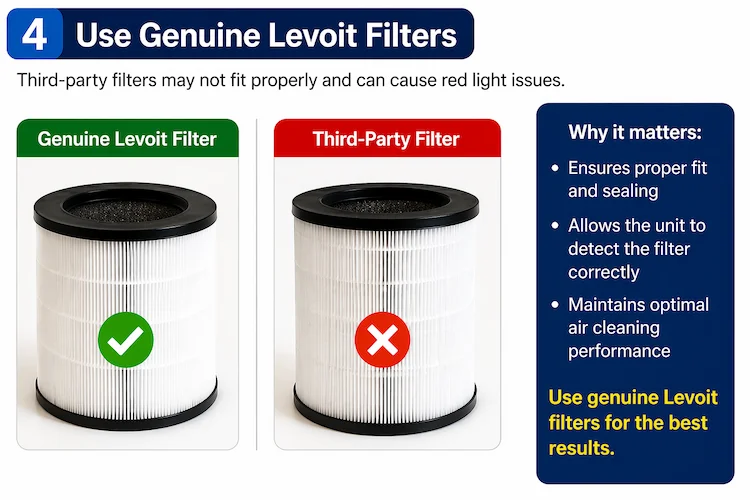
A significant number of persistent red light complaints trace back to non-genuine replacement filters. This is not Levoit’s marketing. There is a functional reason.
Genuine Levoit filters are sized and sealed to specific tolerances for each model. A filter that is even slightly thinner than spec allows a small gap where unfiltered air bypasses the HEPA layer and goes directly back into the room. The unit may also fail to register that a new filter is present, which can prevent the reset from taking hold even after multiple attempts.
If your red light is not responding to resets and you are using a third-party filter, swap it for a genuine Levoit filter and run the reset process again. The difference in filter cost is usually under $10, and it removes this variable from the troubleshooting process entirely.
When the Red Light Is Not a Filter or Sensor Issue
In rare cases, after replacing the filter with a genuine unit, cleaning the sensor, performing a hard reset, and confirming the fan is off during the reset attempt, the red light still refuses to clear or returns immediately. At this point, the issue is likely a hardware fault rather than a maintenance one.
Before contacting Levoit, confirm these things are all true: you are using a genuine Levoit filter for your exact model number, the filter is correctly seated with no packaging plastic left on it, the unit was unplugged for at least five minutes before the last reset attempt, and the fan was fully stopped (not just on its lowest setting) when you pressed the reset button. If all of those are confirmed and the problem persists, it is a warranty case.
Levoit offers a two-year warranty on most current models. You can reach their support team through the official Levoit website or through the VeSync app. Keep your order confirmation handy. In most cases, units with a persistent hardware fault are replaced rather than repaired, and the process is typically straightforward for customers within the warranty period.
For more detailed help with specific Levoit models, our Core 300 review and Vital 200S-P review both include notes on common issues. You can also check Levoit’s official user manuals at levoit.com/pages/user-manuals to confirm the exact reset button location for your model.
FAQS About the Levoit Red Light
If you’re frequently running into filter issues, it might be time to consider a model that’s easier to maintain our full 2026 Levoit comparison highlights which units are most beginner-friendly.